


Work from the provider toward the dashboard. Recreating a missing entity as a widget can hide the real connection or visibility problem.
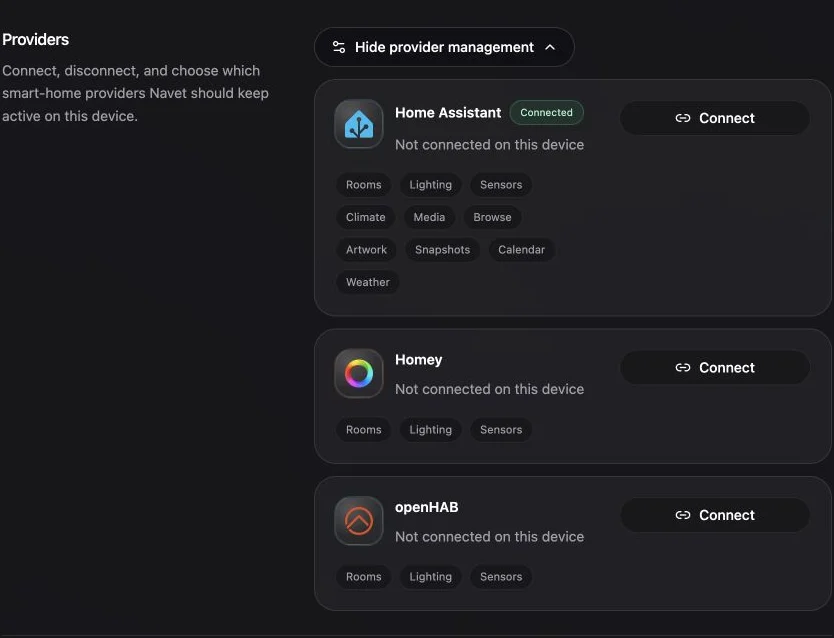
1. Confirm the provider
Open Settings → System → Providers and confirm that the owning provider is connected and selected. Check that the selected entity belongs to a connected provider that supports the feature.
2. Clear navigation and search filters
Return to All rooms, clear search, and open the section that normally owns the entity.
3. Check room assignment
Open the Rooms workspace and inspect:
- The expected room.
- Not in a room.
- Hidden devices.
Move or show the device if needed.
4. Check entity visibility
Open Settings → Dashboard → Entity visibility → Restore entities. Search for the hidden entity and choose Restore beside it. Choose Restore all to bring back every hidden entity. You can also search the Add Card library for a generic entity card.

5. Check provider capability
An entity can exist while an advanced Navet section is unavailable. Provider capability coverage varies, and not every connected platform currently supplies every advanced feature service.
If state is stale
Refresh Navet once and check the owning provider’s connection status.
For a Home Assistant entity whose integration has stopped responding, choose More actions → Reload integration from its unavailable card or entity dialog. Confirm the reload. Other entities from the same integration entry may briefly become unavailable while Home Assistant reconnects it.
This action requires a connected Home Assistant administrator session and an entity linked to a configuration entry. It remains available when the entity is unavailable, but is absent for unsupported entities and providers. A completed reload does not guarantee the entity has recovered; check its live state afterward. Navet reports success only when Home Assistant confirms the entry is loaded. If the request fails, check the integration in Home Assistant, the connection and administrator access before trying again. See Home Assistant’s reload action documentation.
Persistent stale state belongs in a support report with the provider, entity ID, Navet version, installation mode, and visible error.