


Standalone Navet connects to multiple smart-home providers and combines their supported devices and features. Choose sources in the relevant card or feature settings. Each selected entity keeps its provider identity, so controls and data requests reach the correct smart-home platform.
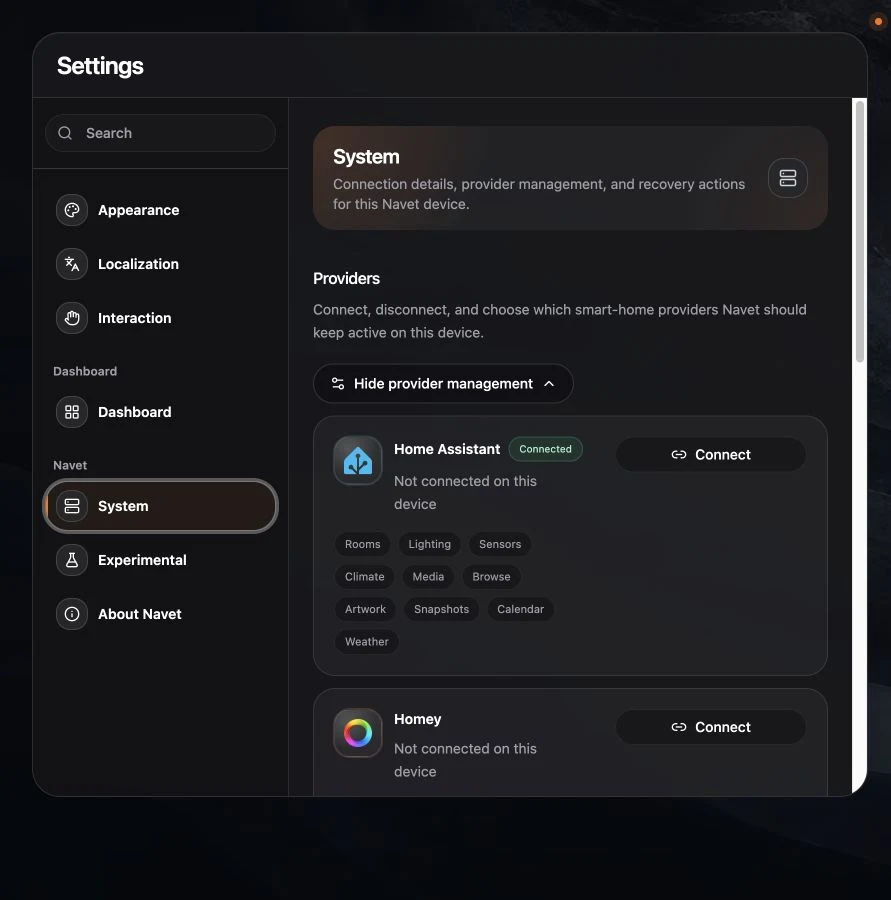
Connect a provider
- Open Settings → System → Providers.
- Expand provider management when it is collapsed.
- Choose Connect.
- Complete the provider-specific flow:
- Home Assistant uses the supported sign-in flow for the current deployment.
- Homey uses its OAuth connection.
- openHAB uses a reachable base URL and credentials.
Provider cards show Connected when Navet can reach the provider. A Homey account can remain signed in while its hub is unavailable. If Homey shows Offline, check that the hub is powered on and reachable from Navet’s network. If this happens during sign-in, choose the Homey again after it comes online. If a connected Homey goes offline later, Navet checks again automatically and shows Connected when the hub responds.
Choose sources
Use the card or feature’s editing controls to choose from available sources. Weather cards can use any weather entity exposed by a connected provider. Calendars combine selected sources, and the Energy metric picker includes energy-related sensors from connected providers.
Available choices depend on your connected providers’ capabilities. Home Assistant currently supplies weather forecasts, calendar events, and the detailed energy history dashboard. Homey supplies Insights history for individual entities. See the capability matrix for provider coverage.
Disconnect
On your primary device, open Settings → System → Providers, open the provider’s menu, and choose Disconnect. The confirmation names the provider and explains that it disconnects across connected devices. Choose Cancel to keep the connection, or Disconnect to proceed. You can connect the provider again later. Disconnecting does not delete devices from the provider.
Availability
Home Assistant supplies Navet’s broadest advanced feature set. Homey also supplies runnable Flows and Moods, people, notifications, and Insights history. openHAB supplies rooms, lights, switches, fans, climate setpoints, speaker controls, locks, covers, security sensors, and utility readings. Hubitat and SmartThings are planned.