


Navet Cards brings lights, rooms, heating, music, and everyday readings into your Home Assistant dashboard. Configure cards in the visual editor or YAML and arrange them with Home Assistant’s dashboard tools.
Navet Cards is an early beta for Home Assistant 2024.6.4 or newer. Read the notes for your selected release before installing.
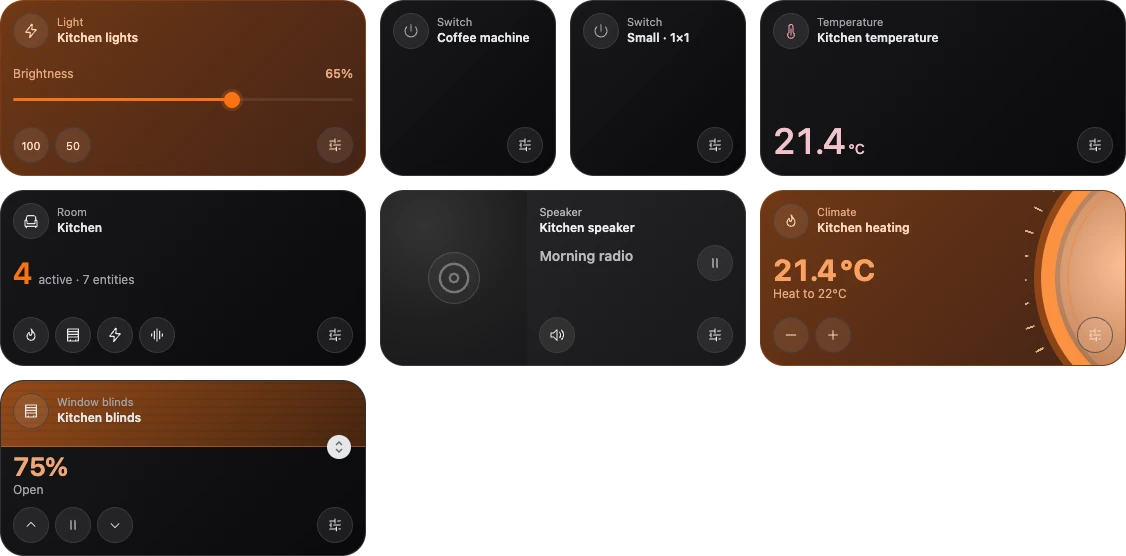
Preview with simulated devices.
Choose Navet or Navet Cards
| Navet | Navet Cards | |
|---|---|---|
| Dashboard | Complete household interface with its own navigation and settings | Custom cards placed in Home Assistant’s dashboard |
| Platforms | Home Assistant, Homey, and openHAB | Home Assistant |
| Setup | Choose a Navet installation | Install a JavaScript card resource |
| Layout | Navet dashboard and room settings | Home Assistant dashboard editor |
Navet Cards runs independently using your Home Assistant login and device connections. The Navet app is optional. Each card shows the controls supported by its selected entity, a device or reading supplied by Home Assistant.
Start here
- Install and add your first card.
- Build a room dashboard with grouped controls.
- Choose appearance and layouts.
- Set up actions and sub-controls for related devices.
Use the card and configuration reference to choose a card type. For resource updates, rollback, or missing cards, see updates and troubleshooting.
Help and feedback
Ask setup questions in Cards Discussions. Report a reproducible problem in Cards Issues with your card version, Home Assistant version, and a minimal configuration.