


Custom extensions provide bounded sidebar actions and optional summary pills. They require manual configuration and should use addresses you trust.
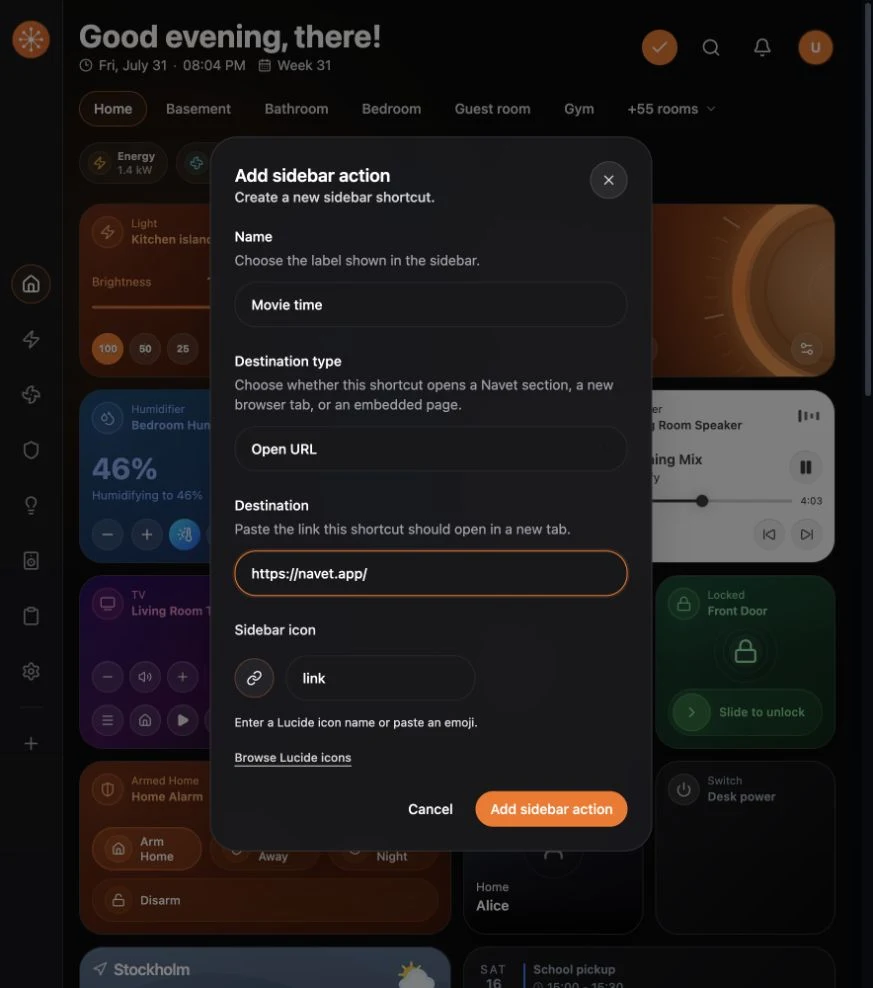
Add a shortcut
- Open Home and choose Customize.
- On desktop, choose the Customize sidebar plus button at the bottom of the sidebar. On a phone, open the section menu and choose Customize sidebar. In kiosk mode, open Kiosk control → Customize → Customize sidebar.
- Enter a short label.
- Choose an icon.
- Choose who should see it: desktop and mobile, desktop only, or mobile only.
Choose a destination
- Navet section opens one of Navet’s main sections.
- New browser tab opens an external address.
- Embedded page opens the address inside Navet.
For a link or embedded page, enter a valid http or https address.
Save and test
Save the extension, then open it from both the intended screen size and normal navigation. Navet limits the number of custom sidebar actions to keep the navigation bounded.
Embedded pages
Some sites block framing through browser security headers. If the page fails:
- Choose Retry once.
- Use Open externally.
- Edit the extension to use a new browser tab.
Navet cannot override another site’s framing policy.